.jpg)
Why Your Fire Alarm Beeps or Chirps Randomly and How To Fix It
Smoke Detector Beeping, Chirping, and Fixes: Key Takeaways
- Chirping is typically a short, recurring tone signaling low battery, expired unit, or sensor issues and likely not an emergency. Beeping is continuous and can sometimes signal smoke or fire
- A chirp every 30-60 seconds is most commonly due to a weakening battery. Change it regularly, at least once a year
- Persistent beeping after troubleshooting could mean a wiring issue or faulty unit. Professional inspection can check your alarm system is reliable and safe
A beeping fire alarm or smoke detector can disrupt your day or your sleep, but it’s more than just an annoyance.
These devices are your home’s first line of defense, designed to alert you to danger or signal an issue that needs attention.
According to the National Fire Protection Association (NFPA), three out of five home fire deaths occur in properties without working smoke alarms, highlighting the importance of keeping them in peak condition.
Today, we’ll walk you through why your fire alarm beeps or chirps randomly, cover common beep causes and explain how to troubleshoot a fire alarm.
Why Do Fire Alarms Beep and Chirp Randomly?
Common reasons why fire alarms beep randomly at night include:
- Low batteries,
- Dust buildup
- Environmental factors like humidity or temperature changes
Smoke Detector Chirping vs. Beeping: What’s the Difference?
Knowing the difference between chirping and beeping can help you respond quickly and appropriately.
- Beeping: A continuous, loud alarm, often signaling smoke, fire damage, or a system test. This requires immediate action to ensure safety
- Chirping: A short, high-pitched tone that repeats every 30 to 60 seconds
This usually signals:
- A low battery
- An expired detector
- A minor malfunction
Pro tip: If your smoke alarm chirps every 30 seconds and you’ve already replaced the battery, check the manufacture date as the unit may have reached the end of its life and needs to be replaced.
Quick Checklist: What To Do When Your Smoke Alarm Beeps or Chirps
| Issue | What It means | What to do |
| Single chirp every 30–60 seconds | Low battery | Replace with a fresh battery |
| Chirping continues after battery replacement | Device expired or malfunctioning | Check manufacture date and replace unit if over 10 years old |
| Beeping when showering or cooking | Steam or humidity | Relocate unit farther from moisture-prone areas |
| Beeping with no smoke or steam present | Dust buildup or sensor issue | Clean detector with soft brush or compressed air |
| Hardwired detector beeping randomly | Loose wiring or power surge | Have an electrician or technician inspect connections |
If your smoke detector keeps chirping and you’re not sure why, don’t worry, most issues have simple fixes.
Whether it’s a low battery, steam from a hot shower, or built-up dust, the pattern and timing of the beeps often point to the exact cause.
Use the quick table overview above to decode common alarm behaviors and learn what steps to take next.
Common Causes of Smoke Detectors Beeping Randomly
Smoke detectors are your home’s first line of defense against fire damage, but random beeping can be disruptive and puzzling.
Understanding the common causes can help you respond to an emergency faster, troubleshoot effectively and maintain your safety system’s reliability.
1. Low Battery Warning: The Most Common Cause
A low battery is the most frequent reason smoke detectors beep randomly. These devices are programmed to emit a short chirp every 30 to 60 seconds when the battery is running low.
This ensures you’re alerted to replace the battery before the detector stops functioning entirely.
Tip: Regularly checking and replacing batteries at least once a year can prevent these interruptions.
2. Accumulation of Dust or Debris in the Detector
Over time, dust, insects, and debris can gather inside the detector, interfering with its sensors. This accumulation can trigger random beeping or even false alarms.
Tip: Cleaning your smoke detector gently with compressed air or a soft brush every few months can help prevent this issue.
Be sure to follow the manufacturer’s guidelines for maintenance to avoid damaging sensitive components.
If your home has recently experienced a fire, soot buildup inside the detector may also trigger false alarms or random beeping.
Recommended read: How To Prevent House Fires
3. Humidity and Temperature Fluctuations
Environmental factors like high humidity or rapid temperature changes can cause smoke detectors to beep unexpectedly.
For example:
- Steam from showers or cooking can mimic smoke particles
- Extreme cold or heat may affect battery performance or sensor functionality
Tip: To minimize false alarms, avoid installing smoke detectors near bathrooms, kitchens, or poorly insulated areas prone to temperature swings.
If your smoke detector has been exposed to heavy smoke or extreme heat, such as during a fire, it may be permanently damaged.
Recommended read: What To Throw Away After Smoke Damage
4. Malfunctioning Sensors or End of Lifespan Signals
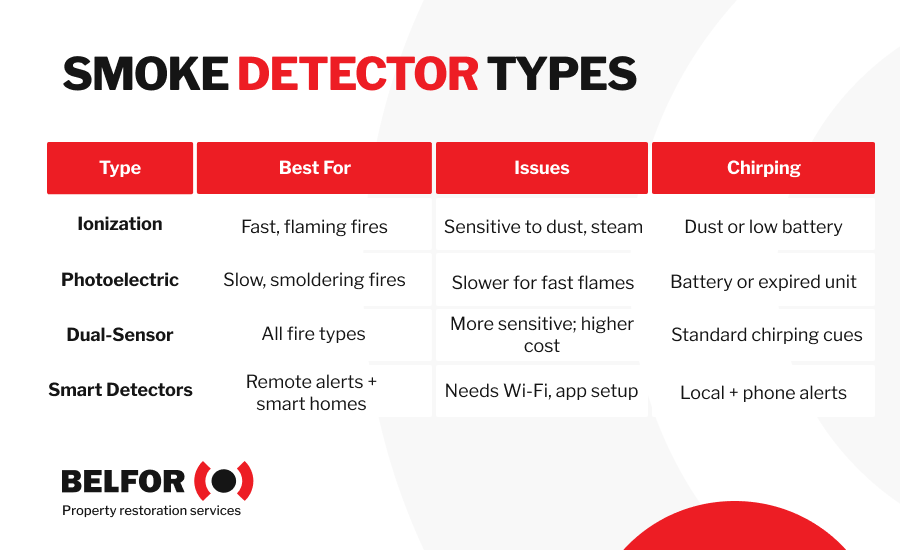
Smoke detectors don’t last forever and have a limited lifespan, typically 7 to 10 years. As they near the end of their service life, many models emit intermittent beeps to indicate it’s time for replacement.
Additionally, faulty sensors, whether from age or manufacturing defects can lead to random beeping.
Tip: Check the device’s manufacturing date (usually printed on the back) to see it’s still within its functional range.
5. Interference From Nearby Devices or Wiring Issues
For hardwired smoke detectors, random beeping may result from electrical interference, loose connections, or power fluctuations.
Wireless devices, such as Wi-Fi routers or baby monitors, can also disrupt the detector’s signal, causing unexpected beeping.
Tip: To prevent interference, check if smoke detectors are properly installed and positioned away from electronic devices that could disrupt their signal.
Step-by-Step Guide To Fixing Smoke Detector Beeping & Chirping Issues
When your fire alarm starts randomly beeping at night, identifying and addressing the issue promptly provides safety and peace of mind.
Follow these steps to troubleshoot beeping:
Step 1: Identify the Source of the Beeping
The first step is to confirm which device is beeping. In homes with multiple smoke detectors or interconnected alarms, it may be difficult to pinpoint the source.
Listen closely for the sound and check each device systematically.
IMPORTANT: Carbon monoxide detectors can also emit similar warning sounds, so verify the type of alarm before proceeding. Smoke damage can contaminate food, clothing, electronics, and even furniture, learn how smoke damage really affects your home.
Chirping tip: Chirping often comes from only one detector, the one with a low battery or sensor issue, not the entire network.
Step 2: Check and Replace Batteries
Low batteries are the most common cause of random beeping. Open the device and check the battery compartment.
Replace the old batteries with fresh ones, ensuring they are installed correctly. After replacing the batteries, allow a few minutes for the detector to reset.
A steady green light or absence of beeping typically indicates the issue is resolved.
Chirping tip: If the detector chirps every 30–60 seconds, this is a classic low battery warning.
Step 3: Inspect and Clean the Detector
Dust, dirt, or insects can interfere with the detector’s sensors, triggering false alarms or random beeping. Carefully remove the device and clean it using a soft brush or compressed air.
Pay special attention to vents and openings where debris may accumulate. Regular cleaning not only resolves beeping but also extends the life of your fire alarm.
Chirping tip: Dirt inside the sensor can mimic end-of-life behavior and cause chirping even after battery replacement.
Step 4: Test the Detector After Resetting
After cleaning and replacing batteries, test the detector to see if its functioning correctly. Press and hold the test button until you hear the alarm.
If the beep is steady and loud, the device is working as intended. If the random beeping continues, proceed to the next step.
Chirping tip: If chirping persists after a successful test, check the manufacture date, the unit may be expired.
Step 5: Call a Professional if the Beeping Persists
If your fire alarm continues to beep after troubleshooting, it may indicate a deeper issue, such as sensor malfunction or wiring problems.
In this case, it’s best to call a professional technician to inspect and resolve the problem.
Timely emergency response and professional assistance ensures your alarm system is reliable and provides peace of mind.
Chirping tip: Alarms over 7–10 years old often chirp even with new batteries, a signal that it’s time to replace the unit entirely.
How To Turn Off a Fire Alarm or Smoke Detector
A fire alarm or smoke detector is a vital safety device, but there are times when it may need to be turned off temporarily, such as during a false alarm or while addressing a malfunction.
It’s important to do this safely and responsibly so your system remains operational when you need it most.
Follow these steps to silence your alarm safely:
- Identify the type of alarm: Determine whether your alarm is battery-operated, hardwired, or part of an interconnected system. This distinction helps you understand how to disable it correctly and avoid affecting other units in the system.
- Press the silence or reset button: Most alarms come equipped with a “silence” or “reset” button. Locate this button, often on the front or side of the device, and press it firmly. This action usually stops the beeping temporarily while you address the cause, such as replacing a battery or cleaning the unit.
- Address the underlying cause: After silencing the alarm, take immediate steps to identify and resolve the issue. First, replace any low batteries and clean the unit to remove dust or debris. Next, check for potential false triggers, such as steam or humidity.
Schedule a Professional Fire Alarm Inspection and Upgrade With BELFOR
At BELFOR, we understand the important role fire alarms and smoke detectors play in safeguarding your home and loved ones.
With decades of expertise and a commitment to excellence, our team makes sure your fire safety systems are in top condition.
Whether you need a routine inspection, help troubleshooting persistent issues, or an upgrade to a more advanced system, BELFOR is here to make the process seamless and stress-free.
When you partner with us, you can expect:
- Expert evaluations: Our trained professionals assess your fire alarm system to identify potential equipment issues and align compliance with the latest safety standards
- Advanced upgrades: We help you choose and install modern fire alarm solutions tailored to your home’s needs, enhancing safety and reliability
- Comprehensive support: From inspections and testing to maintenance and repairs, we provide full-service care for your fire safety systems
- Trusted experience: With over 70 years of industry leadership, BELFOR delivers unmatched expertise you can rely on
- Immediate activation: One call to our 24-hour hotline connects you to rapid emergency support, with a team on-site in as little as four hours
If you’re unsure what can be saved after a fire, our smoke damage cleanup services cover everything from assessment to full restoration.
Fire Alarm Beeping Randomly: FAQs
Why is my smoke detector beeping when there’s no smoke?
It may be due to low battery, dust buildup, humidity, or sensor malfunction. Chirping often signals a maintenance issue, not necessarily fire.
What does it mean when a smoke detector chirps every 30 seconds?
This is a low battery warning or end-of-life signal. Try replacing the battery first; if chirping continues, replace the entire unit.
Can heat or humidity cause smoke detectors to beep?
Yes. Steam from showers, cooking, or rapid temperature changes can trigger false alarms or sensor confusion. Avoid installing alarms too close to bathrooms or kitchens.
How do I stop my fire alarm from beeping randomly?
Follow these steps:
- Replace the battery
- Clean the unit with compressed air
- Check the expiration date
- Reset the alarm
If the beeping persists, contact a professional technician to inspect the device.
What is intermittent beeping on a fire alarm?
It refers to occasional chirps or beeps not caused by smoke or fire. This often indicates a minor issue needing troubleshooting.


